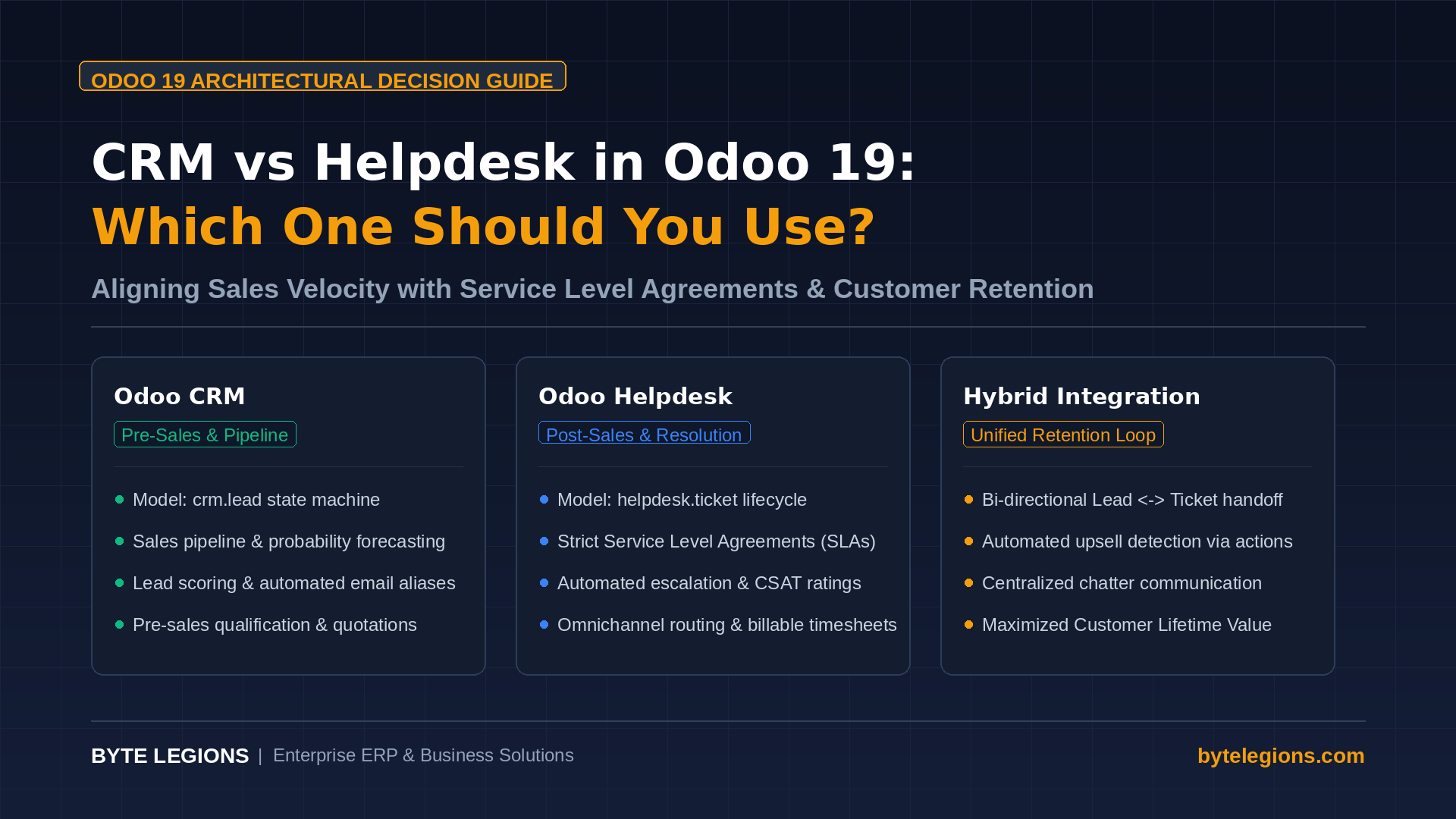
Evaluating the architectural divide between CRM vs Helpdesk Odoo 19 requires understanding how transactional data flows across your commercial and technical ecosystems. While both applications utilize kanban stages, activity tracking, and communication chatter, their underlying data structures serve opposing business lifecycles. Deploying the wrong module or misconfiguring their overlap creates fragmented communication, inaccurate forecasts, and administrative overhead.
Odoo 19 refines these boundaries by introducing tighter automation rules, enhanced chatter intelligence, and granular stage controls. Making an informed deployment choice depends on whether your operational priority is closing net-new deals or fulfilling post-sales commitments through service level agreements.
Core Architectural Divergence: crm.lead vs helpdesk.ticket
The primary technical distinction centers on the database entities that govern each module. Odoo CRM executes on the crm.lead model, while Helpdesk operates entirely within the helpdesk.ticket model. Both models inherit foundational mixins like mail.thread and mail.activity.mixin, providing familiar chatter mechanisms, yet their relational dependencies diverge sharply.
Structural Objectives: Pre-Sales Pipeline vs Issue Resolution
The crm.lead entity is designed around monetary velocity and probabilistic progress. Every record ties directly to expected revenue, probability percentages, partner contacts, and sales team assignments. Its internal state machine tracks forward momentum through defined opportunity stages, such as Qualification, Proposition, and Won. Once a record reaches Won, its primary commercial lifecycle concludes, yielding downstream accounting invoices, subscription contracts, or delivery orders.
In contrast, helpdesk.ticket focuses on incident duration, customer satisfaction rating (CSAT), and resolution efficacy. The record lifecycle is circular rather than linear; tickets open upon an inquiry, move through investigation, pause on client response, and reach closure upon resolution. Rather than tracking expected gross margins, tickets monitor resolution time, billable hours, and contractual compliance under defined service level agreements (SLA).
Key Functional Capabilities Comparison Matrix
Selecting the right environment requires assessing how each app handles incoming channels, priority metrics, and automated assignments.
| Feature Area | Odoo 19 CRM (crm.lead) | Odoo 19 Helpdesk (helpdesk.ticket) |
|---|---|---|
| Primary Objective | Pre-sales qualification and revenue generation | Post-sales support workflow and problem remediation |
| Revenue Tracking | Expected revenue, probability, recurring revenue (MRR) | Non-monetary; tracks billable timesheets and refund cost |
| Performance Metrics | Conversion rate, deal velocity, sales quota attainment | SLA compliance percentage, first response time, CSAT score |
| Customer Ingestion | Web contact forms, marketing campaigns, inbound calls | Inbound email aliases, customer portal, live chat widgets |
| Resource Allocation | Sales teams, territories, and quota distribution | Support teams, specialized skill tags, and round-robin assignment |
| Native Integration | Quotations, Subscriptions, Sales Orders, e-Sign | Field Service, Helpdesk Timesheets, Repairs, Returns (RMA) |
Sales Pipeline Management and Revenue Forecasting in CRM
In Odoo 19 CRM, sales pipeline management functions as the engine for sales revenue forecasting. The platform aggregates deal values across configurable probability brackets, enabling finance leaders to project cash flow accurately. Sales leaders configure automated email alias endpoints to ingest inbound prospects, where automated lead assignment rules route high-value accounts to designated account executives based on geography or industry.
Furthermore, pre-sales qualification tools in CRM allow representatives to enrich profiles with company revenue, employee counts, and decision-maker roles. Multi-team communication chatter keeps sales management aligned without cluttering the customer profile with operational troubleshooting histories.
SLA Policies and Automated Escalation Rules in Helpdesk
Odoo 19 Helpdesk transforms customer support ticketing into an accountable, metrics-driven operation. By implementing service level agreements (SLA), organizations define rigid response and resolution deadlines determined by customer tier, product category, or ticket priority.
Automated escalation rules track elapsed time in real time. If a high-priority ticket approaches an SLA breach, Odoo triggers visual warning tags, reassigns the ticket to senior support engineers, or alerts team leads via internal chatter notes. Omnichannel ticket routing captures client issues from email, web forms, and customer portals, distributing incoming requests through round-robin or balanced workload algorithms. For organizations looking to extend operational excellence across related business functions, explore our collection of in-depth guides on the Byte Legions technical blog.
When to Deploy Odoo 19 CRM Alone
Deploying CRM exclusively is ideal for businesses characterized by high transaction frequency, short operational engagements, or standardized products that do not require ongoing troubleshooting.
- Transactional E-Commerce and Distribution: Companies selling physical goods where customer inquiries relate strictly to tracking numbers or order placements rather than troubleshooting.
- Direct Business-to-Consumer (B2C) Sales: Environments where customer lifetime value is built through automated email marketing and repeated promotions rather than technical support.
- Early-Stage Consulting Teams: Consultancies whose initial engagements focus solely on closing deals before delivering projects directly in Odoo Project without a secondary service desk.
In these environments, adding Helpdesk adds redundant navigation steps for reps who already manage account communications directly within the sales order chatter.
When to Implement Odoo 19 Helpdesk Alone
Operating Odoo 19 Helpdesk without CRM makes strategic sense for companies with contracted client bases, internal support functions, or centralized public service desks.
- Internal IT Support and Human Resources: Internal service desks managing employee hardware, software provisioning, and HR requests need strict SLAs and routing, not sales probability formulas.
- Managed Service Providers with Long-Term Contracts: MSPs operating on fixed multi-year retainers where all work arrives as maintenance tasks, bug reports, and timesheet billing on tickets.
- Warranty and Repair Centers: Facilities handling Return Merchandise Authorizations (RMA) and warranty inspections, where helpdesk team performance metrics directly impact customer retention.
Deploying Helpdesk independently ensures support agents focus exclusively on resolving issues without being burdened by sales stages or quotation pipelines.
The Hybrid Blueprint: Integrating CRM Leads with Helpdesk Tickets
For scaling enterprises, the true power of Odoo 19 enterprise features emerges when CRM and Helpdesk run in synchronized harmony. In modern B2B organizations, sales and customer service form a continuous feedback loop that drives recurring customer retention.
When a client raises a ticket expressing dissatisfaction during delivery, that signal must be visible to the account manager before renewal discussions. Conversely, when an existing customer submits an inquiry to support requesting custom product enhancements, that request represents an expansion opportunity that belongs in the sales pipeline.
Automated Lead to Ticket Conversion Logic
Odoo 19 supports bi-directional conversion. From a support ticket, agents can click the Action cog and select Convert to Opportunity, automatically transferring message history, customer details, and attachments into a new crm.lead record.
When your business logic demands automated routing based on customer tier or custom fields, an automated action bridges the models seamlessly.
Python Automation Snippet for Cross-Model Handoff
The following server action snippet demonstrates how Odoo 19 detects an upsell request within a closed support ticket and instantiates an opportunity inside the sales pipeline:# Server Action executed on model ‘helpdesk.ticket’
# Trigger: On Stage Update to ‘Commercial Opportunity’
if record.partner_id and record.stage_id.name == ‘Commercial Opportunity’:
existing_lead = env[‘crm.lead’].search([
(‘partner_id’, ‘=’, record.partner_id.id),
(‘name’, ‘=’, f”Expansion: {record.name}”),
(‘type’, ‘=’, ‘opportunity’)
], limit=1)
if not existing_lead:
new_opportunity = env[‘crm.lead’].create({
‘name’: f”Expansion: {record.name}”,
‘partner_id’: record.partner_id.id,
‘user_id’: record.partner_id.user_id.id or record.user_id.id,
‘team_id’: env.ref(‘sales_team.salesteam_website_sales’).id,
‘description’: f”Automated handoff from Helpdesk Ticket #{record.id}:\n{record.description or ”}”,
‘type’: ‘opportunity’,
‘priority’: ‘2’,
})
record.message_post(
body=f”Opportunity created successfully: <a href=’/odoo/action-crm/{new_opportunity.id}’>{new_opportunity.name}</a>”
)
This workflow eliminates manual data reentry, preserves customer context, and gives sales executives immediate visibility into incoming commercial demand.
Conclusion: Making the Right Investment for Your Operations
Choosing between Odoo 19 CRM and Helpdesk is not an either-or dilemma for mature businesses; it is an architectural decision regarding where your customer interactions reside. Use Odoo CRM to empower sales personnel with clean pipelines, precise probabilities, and actionable forecasting. Use Odoo Helpdesk to enforce operational accountability through rigorous SLAs, automated escalations, and measurable customer satisfaction.
When your organization unites both modules through structured handoff rules, your teams bridge the gap between acquisition and retention, building sustainable operational scale. To design an optimized ERP workflow tailored specifically to your company architecture, Book a Consultation with Byte Legions today.
Frequently Asked Questions
Can Odoo 19 Community Edition run both CRM and Helpdesk?
Odoo CRM is fully available in the open-source Community edition, offering full sales pipeline management and opportunity tracking. However, the official Odoo Helpdesk app is exclusive to Odoo Enterprise. Businesses running Community edition can leverage third-party OCA community modules like helpdesk_mgmt to handle customer support ticketing, though Enterprise provides tighter native integration with Field Service, Sign, and automated escalation rules.
How do timesheet billing on tickets work compared to CRM leads?
Helpdesk tickets natively support recording billable employee hours through Odoo Timesheets, which link directly to prepaid service contracts or prepaid sales order packs. CRM leads do not link natively to billable timesheet lines, as activities logged on leads represent non-billable pre-sales overhead.
Can an inbound email alias create both a lead and a ticket simultaneously?
An email alias routes messages to a single primary destination model. Attempting to generate both entities directly from one alias creates duplicate communication threads. The recommended architectural approach is directing support-specific aliases (such as support@yourdomain.com) to helpdesk.ticket and sales inquiries (such as sales@yourdomain.com) to crm.lead, then configuring automated handoff rules for edge cases.
How does Odoo 19 track customer satisfaction rating (CSAT) across both apps?
CSAT surveys are natively integrated into Odoo Helpdesk stage transitions, allowing administrators to send automated customer satisfaction surveys when a ticket reaches its closing stage. While CRM provides win-loss tracking upon marking leads Won or Lost, it does not send standardized CSAT feedback surveys.
What is the cleanest way to manage post-sales warranty claims in Odoo 19?
Warranty claims should be handled in Odoo Helpdesk rather than CRM. Helpdesk integrates out of the box with the Repairs, Returns (RMA), and Quality modules. Support agents can trigger warranty parts shipments, create repair work orders, and document serial number defects directly from the support ticket interface.